Sunday, March 8, 2009

Linux Kernel for Fujitsu-Siemens Loox N560/C550 with usbnet working

After 3 days of struggle I am finally able to build a linux kernel for my PDA Fujitsu-Siemens Loox N560. The kernel has been downloaded from http://www.asm32.ru and patched (pxa27x_udc.c) to support for usbnet (host-to-PDA networking through a usb coard). Also I've made a diff file with differences between the current cupcake kernel and the kernel (by date 02-mar-2009) from asm32.ru site. That will be useful later when I need to apply support for Loox to a new upstream cupcake kernel. Here is the patch which also includes support for usbnet on Loox C550/N560. The patch already contains a kernel configuration file (.config), but usbnet support is not enabled there. Here is the other .config file which is differ from that included in the patch by supporting usbnet, having power management switched off and configuration for larger fonts in console.

It is possible to build the kernel with any toolchain for arm of your choice. I've tried crosstool-ng, emdebian and the one that is included in the android repo. I have decided to leverage emdebian toolchain for I use debian on my PC. The following is the command to build the kernel using emdebian toolchain:
make ARCH=arm CROSS_COMPILE=arm-linux-gnueabi-
Of course you have to have emdebian toolchain installed. You can install emdebian something like it is shown below:

apt-get install emdebian-tool
emsetup --arch arm
Then add:

deb http://www.emdebian.org/debian/ unstable main

into your /etc/apt/sources.list and run:
apt-get install linux-kernel-headers-arm-cross gcc-4.2-arm-linux-gnu

When the kernel is built and ready you can copy it on an SD card and run it with haret with the following default.txt:

set MTYPE 1454
set KERNEL zImage
set CMDLINE "root=179:2 mem=60M rootdelay=3 boot_delay=0 init=/init console=tty0 fbcon=rotate:0 androidboot.console=tty0 android.checkjni=1"
set RAMADDR 0xA0200000
bootlinux
That is important! When you've placed zImage on an SD card, you will insert the card in your PDA. And then you must reboot your PDA! And only after you have rebooted your PDA with the SD card inside, you should ask haret to boot linux. That is very important because a linux kernel will not be loaded correctly (or it will but with only 10% chances) if one of the following conditions is true:
1. PDA has fallen asleep or suspended.
2. You have just inserted an SD card in your PDA and not rebooted it yet.
It looks like it is a bug in wince...

P.S. There you can download cupcake kernel http://source.android.com/download

P.P.S. When you build kernel with usbnet, don't set CONFIG_USB_ETH_RNDIS to 'y'! Or your PC kernel (2.6.x) will not find your PDA... neither cdc_ether nor cdc_subset will claim your PDA.

Friday, March 6, 2009

Async Related Posts Widget

I have finally implemented a feature I wanted to have on my blog. It is Related Posts Widget, but not just Yet Another Related Posts Widget. It differs form all other widgets that show related posts. It has features that no other widget has (yet at least):
1. It sorts related posts not only by date, but by relevance!
2. It is small. It is fast. It is asynchronous!. It is just AJAX :).
3. It is easy to install. It is very crucial point for me because I maintain a bunch of blogs and I don't want to waste my time doing coplicated setups for each blog over and over again.

So, lets install the widget in a blog. The installation process constists of two simple modifications to the blog HTML Template. Go to Settings -> Layout -> HTML Template. But Before you start doing any modification, make a backup of your template (Download full template)! Now you are ready. The option Expend Widget Templates should be checked. Then follow the steps below:
1. Find string <data:post.body/> in your template code. Right after(!) this string, insert the snipped below:
<div caption='Related posts:' id='akRelatedPosts' max='8'/>
<b:if cond='data:blog.pageType == &quot;item&quot;'>
<script language='javascript' type='text/javascript'>
(function(_1,_2){var _3={};var _4=_2.length;var _5=function(_6){var _7=&quot;([0-9]{4})(-([0-9]{2})(-([0-9]{2})(T([0-9]{2}):([0-9]{2})(:([0-9]{2})(.([0-9]+))?)?(Z|(([-+])([0-9]{2}):([0-9]{2})))?)?)?)?&quot;;var d=_6.match(new RegExp(_7));var _9=0;var _a=new Date(d[1],0,1);if(d[3]){_a.setMonth(d[3]-1)}if(d[5]){_a.setDate(d[5])}if(d[7]){_a.setHours(d[7])}if(d[8]){_a.setMinutes(d[8])}if(d[10]){_a.setSeconds(d[10])}if(d[12]){_a.setMilliseconds(Number(&quot;0.&quot;+d[12])*1000)}if(d[14]){_9=(Number(d[16])*60)+Number(d[17]);_9*=((d[15]==&quot;-&quot;)?1:-1)}_9-=_a.getTimezoneOffset();time=(Number(_a)+(_9*60*1000));return Number(time)};var _b=function(){var _c=[];for(var i in _3){_c.push(_3[i])}if(_c.length&lt;1){return}var _e=document.getElementById(&quot;akRelatedPosts&quot;);if(!_e){return}var _f=_e.getAttribute(&quot;max&quot;)||5;_c=_c.sort(function(a,b){var _12=b.weight-a.weight;if(_12!=0){return _12}return b.date-a.date});var s=&quot;&lt;ul&gt;&quot;;for(var i in _c){if(_f--&lt;1){break}var _14=_c[i];s+=&quot;&lt;li&gt;&lt;a href=&#39;&quot;+_14.href+&quot;&#39;&gt;&quot;+_14.title+&quot;&lt;/a&gt;&lt;/li&gt;&quot;}s+=&quot;&lt;/ul&gt;&quot;;var _15=_e.getAttribute(&quot;caption&quot;);s=&quot;&lt;span class=&#39;caption&#39;&gt;&quot;+_15+&quot;&lt;/span&gt;&quot;+s;_e.innerHTML=s};var _16=function(_17){for(var i in _17.feed.entry){var _19=_17.feed.entry[i];var _1a=_19.id[&quot;$t&quot;];var _1b=_3[_1a];if(_1b){_1b.weight++}else{var _1c;for(var _1d in _19.link){if(_19.link[_1d].rel==&quot;alternate&quot;){_1c=_19.link[_1d].href;break}}if(_1c==_1){continue}_1b={weight:1,title:_19.title[&quot;$t&quot;],date:_5(_19.published[&quot;$t&quot;]),href:_1c};_3[_1a]=_1b}}if(--_4==0){_b()}};var _1e=function(_1f){var _20;try{_20=new XMLHttpRequest()}catch(excp1){try{_20=new ActiveXObject(&quot;Msxml2.XMLHTTP&quot;)}catch(excp2){try{_20=new ActiveXObject(&quot;Microsoft.XMLHTTP&quot;)}catch(excp3){_20=false}}}var _21=function(){if(_20.readyState==4){if(_20.status==200){_16(eval(&quot;(&quot;+_20.responseText+&quot;)&quot;))}}};_20.open(&quot;GET&quot;,_1f,true);_20.onreadystatechange=_21;_20.send(null)};for(var _22 in _2){_1e(_2[_22])}} <!-- = = = = = endoffunc = = = = = = -->
)(&quot;<data:blog.url/>&quot;,[
<b:loop values='data:post.labels' var='label'>
&quot;/feeds/posts/default/-/<data:label.name/>?alt=json&amp;max-results=5&quot;<b:if cond='data:label.isLast != &quot;true&quot;'>,</b:if>
</b:loop>
]);
</script>
</b:if>
You should end up with something like this (click on the picture to open a full-size version):
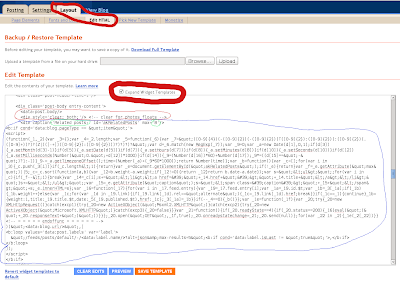
Pay attention to caption='...' and max='8' You may consider to edit these values. A value for caption defines text to be shown above a list of related posts. And max defines a number of displayed relevant posts.
2. This step is optional. Everything should start working without it, but the widget will not be nice-looking. That is why you may want to complete it. So find the string ]]></b:skin>. And insert the following css snippet before(!) the string:
#akRelatedPosts {
padding-top: 20px;
}

#akRelatedPosts .caption {
font-weight: bold;
}

#akRelatedPosts ul {
margin: 0;
}
If you think you have knowledge of css, you can tweak the styles below as you like. Finally you should see a picture like the following (click on picture to see full-size version):
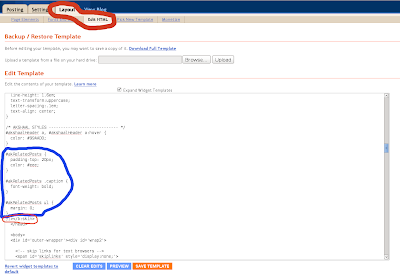
That is all. You can save your template and check your posts.

Thursday, March 5, 2009

Cross-site request

It is handy to test javascript snippets without uploading them on a production server. But it is hard to test AJAX request like that. The reason for it is that firefox doesn't allow a cross-site request for a sake of user's security.
uncaught exception: Access to restricted URI denied (NS_ERROR_DOM_BAD_URI)
But if you know what you are doing you can temporarley switch this behavior off. Open about:config page and set signed.applets.codebase_principal_support to true. Also your script must have the following line executed before any cross-site request:
netscape.security.PrivilegeManager.enablePrivilege("UniversalBrowserRead");
And don't forget to set signed.applets.codebase_principal_support to false value back and remove the line above from script when you have done with testing!!

Saturday, February 28, 2009

Remove Solid Border

If you want to crop a picture stripping it from a border of some solid color, in linux you can use convert command which is a part of ImageMagick package:

convert original.jpg -trim modified.jpg

In a case you have a set of pictures, use find command to execute convert:
find *.jpg -exec convert {} -trim out/{} \;

Where out is a directory for converted images.

Monday, February 23, 2009

Extract Config from zImage

It was hard for me to find this simple thing in internet, so I gonna make life for someone a little bit easier.

If you want to extract config file from existing linux image, zImage or bzImage, do the following:
  • Download archive file with linux sources.
  • Unpack linux kernel sources
  • Go into root directory of the kernel sources
  • Run chmod 755 ./scripts/extract-ikconfig
  • Run ./scripts/extract-ikconfig /tmp/zImage > /tmp/config
Where /tmp/zImage is a file you want to extract a config from. And /tmp/config it is a filename for the extracted config.

Sunday, February 22, 2009

Top Delusions About Google Sites

As far as I can see from forums, the most common delusion about Google Sites are:
1. Google Sites doesn't support custom domains. This is not true. Google Sites supports custom domains. You can map any part of google site to any domain.
2. Google Sites gives you absolute freedom to populate your site with legal content. This is not true. For example you are not allowed to use adsense units on your Google Site.

Saturday, February 21, 2009

Google Blogger & AdSense

Blogspot had build-in way to insert AdSense ads in blog. But for some reasons it was not enough for me. For instance, I wanted to leverage channels feature of Google AdSense, but it was impossible with build-in AdSense widget. On the other hand, Google Blogger made it possible to edit a blog template, even insert arbitrary Javascript code. So I decided to go this way to insert my custom adsense code. It seemed to be simple to do, but I wasted 3 hours of my time trying to make it work. For these 3 hours I had been trying to understand why a code generated by AdSense and inserted into HTML Template of my blog didn't work. Instead of any advertisement I saw empty space where an advertisement should be. And even empty space was of wrong size (not the size I chose for the unit). An investigation revealed some details. With a help of firebug I discovered that browser sent a request to http://googleads.g.doubleclick.net and got response 400 Bad Request. Why request was baaaaad, adsense server didn't bother to tell. I compared behavior of an adsense unit that was working and behavior of the non-working unit. I noticed that the non-working unit didn't provide a client id and other info to the AdSense server in request, there values were undefined. The reason for the response 400 was clear now. I suspected that problem could be in javascript code generated by AdSense. The code looked like this:
<script type="text/javascript"><!--
[... something like var blah=blah-blah-blah; ...]
//-->
</script>

Although there was nothing wrong with this code, I considered to remove <!-- and //--> chunks. The chunks I removed were there just to support old browsers or browsers without javascript turned on. And it helped! Everything went fine. But AdSense prohibited any modifications to generated code. And then I suspected a problem with HTML Template itself, not with AdSense code. I rewrote code to make it look like this:
<script type="text/javascript">&lt;!--
[... something like var blah=blah-blah-blah; ...]
//--&gt;
</script>

And that worked as well!

There is a possible reason for this. It looks like BlogSpot engine parses template to some internal structure. And then, from this internal structure (DOM tree) it generates HTML code. And the problem is that it doesn't preserve new line characters inside a comments <!-- -->. A browser cuts off this comment before javascript engine begins it work.